How do I bring my old jobs and estimates into new software?
Before you cancel your old app, export everything it lets you: the jobs report with every column, estimates, invoices, customers and your price list, as spreadsheets, plus PDFs of the estimates and invoices that matter. Bring your clients and prices in first, then your jobs and their line items, and check the totals against the old app before you trust them.
Nobody wants to retype two years of jobs. Most of it can come over if you export it the right way before the old login goes away.
Moving over without losing a job.
Export before you cancel.
While you can still log in: customers, jobs report, estimates, invoices and price list. Tick every column the export offers.
Save PDFs of what's still open.
Estimates, invoices and signed contracts for the jobs you're still building or still collecting on.
Bring in clients and prices first.
Jobs land on clients, and line items match your price list, so those go in first.
Then the jobs and their line items.
Match each job by job number or client so nothing doubles up.
Check the totals.
Every job's lines should add up to what the old app said. Fix the few that don't before you count on them.
Keep old jobs as history.
Finished jobs belong on the client's record, not in your active pipeline.
Don't email anyone.
Moving your data should never send a client a reminder or an invoice.
Bring over old jobs.
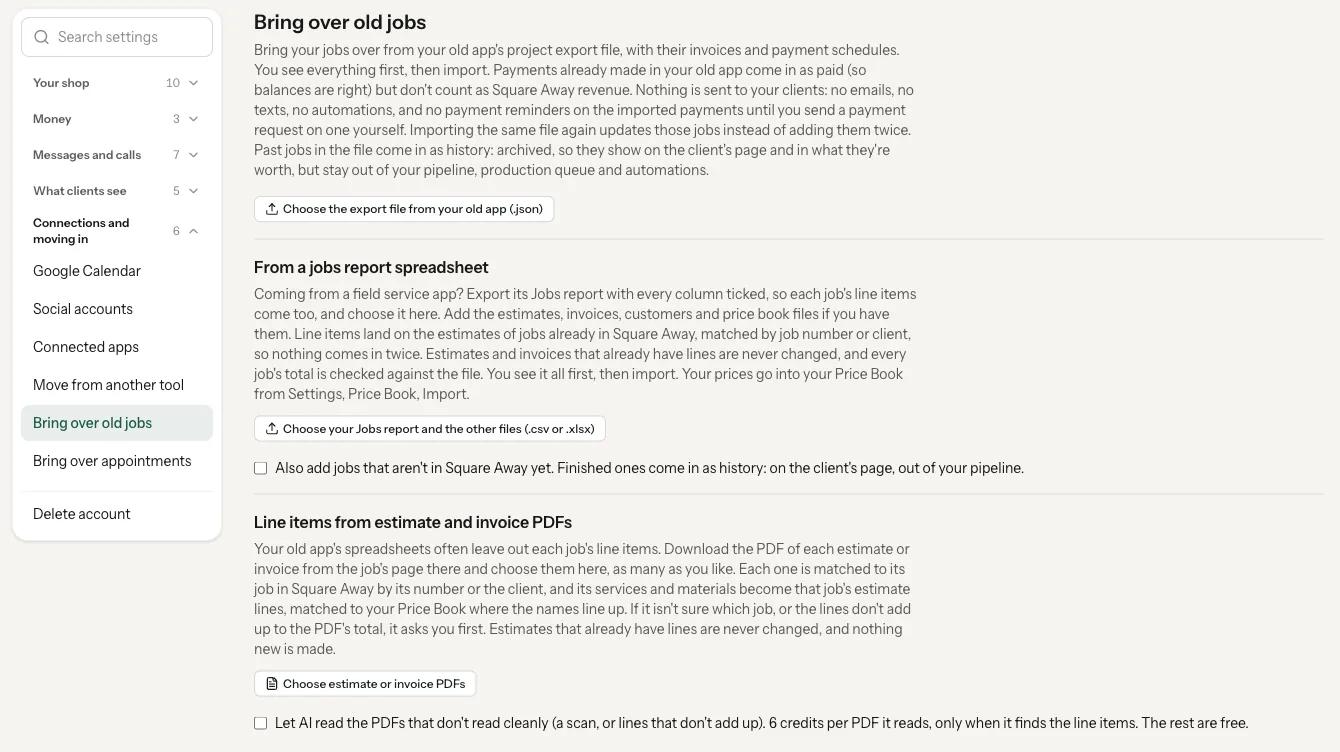
The shop owner opens Settings, Connections and moving in, Bring over old jobs. Nothing you bring in is sent to your clients.
- From a jobs report spreadsheet. Coming from a field service app? Export its Jobs report with every column ticked, and add the estimates, invoices, customers and price book exports too, up to 10 CSV or Excel files. The preview shows what happens to each job, its lines, the lines total and the file's total, and warns when they don't match. Tick one box to also add jobs that aren't in Square Away yet; finished ones come in as history. Free, no credits.
- From estimate and invoice PDFs. Upload up to 25 PDFs at a time. It reads the line items onto jobs you already have, and you pick the job and the option that was sold when it can't tell. Estimates that already have lines are never changed. Reading a clean PDF is free; for scans or PDFs that don't add up, you can let AI read them for 6 credits a PDF, only when it finds the line items.
- Your price list comes in from Tools, Price Book, Import your existing prices, from a CSV or Excel file.
- Your client list comes in from a spreadsheet, with a preview first. See Moving your shop over for what comes over and what doesn't.
Set it all up for me, free.
When you sign up, tick Set it all up for me (free), add a card, and send us your files: customers, invoices, price sheets and spreadsheets, as CSV, Excel, PDF or photos, or email them to [email protected]. We bring it all in and get your shop running. There's no setup call for the import, and you aren't charged until your 14-day trial ends. Already on a free trial without a card? The same offer is on your Home screen.
What it does, and what it leaves to you.
The preview shows each job's lines total next to the file's total. Look at the ones that don't match.
Estimates and invoices that already have lines are left alone.
PDF reads go onto jobs that already exist. Use the jobs report to add new ones.
Bringing jobs over is limited to the shop's owner.
More on moving over.
Can I import my jobs from a field service app?
Yes. Export the Jobs report with every column, plus the estimates, invoices, customers and price book exports, and bring them in on Bring over old jobs. You see every job before anything is saved.
Will my clients get emails when I import?
No. Bringing jobs, clients or line items in sends nothing to your clients.
Does it cost anything to bring my data over?
The spreadsheet import and clean PDF reads are free. AI reads of messy PDFs are 6 credits each, only when they find line items. Having us set it all up is free.
Do I need a setup call to move my data?
No. Send your files with Set it all up for me (free) and we do the import. Setup calls are still there if you want one.
Send us your files and we'll do the rest.
Claim your spot, tick Set it all up for me (free), and send what you have. We'll bring it in and get your shop running.