How do small woodworking shops schedule production?
Put every sold job on one board in the order you'll build it, with a realistic number of shop days for each. Run big builds one at a time, slot small filler jobs around them while glue and finish dry, and give clients a start week with some padding instead of an exact day. When something slips, move it on the board and tell the client before they have to ask.
A small shop doesn't need a factory schedule. It needs one honest answer to "when can you start?" and a crew that knows what's next without asking.
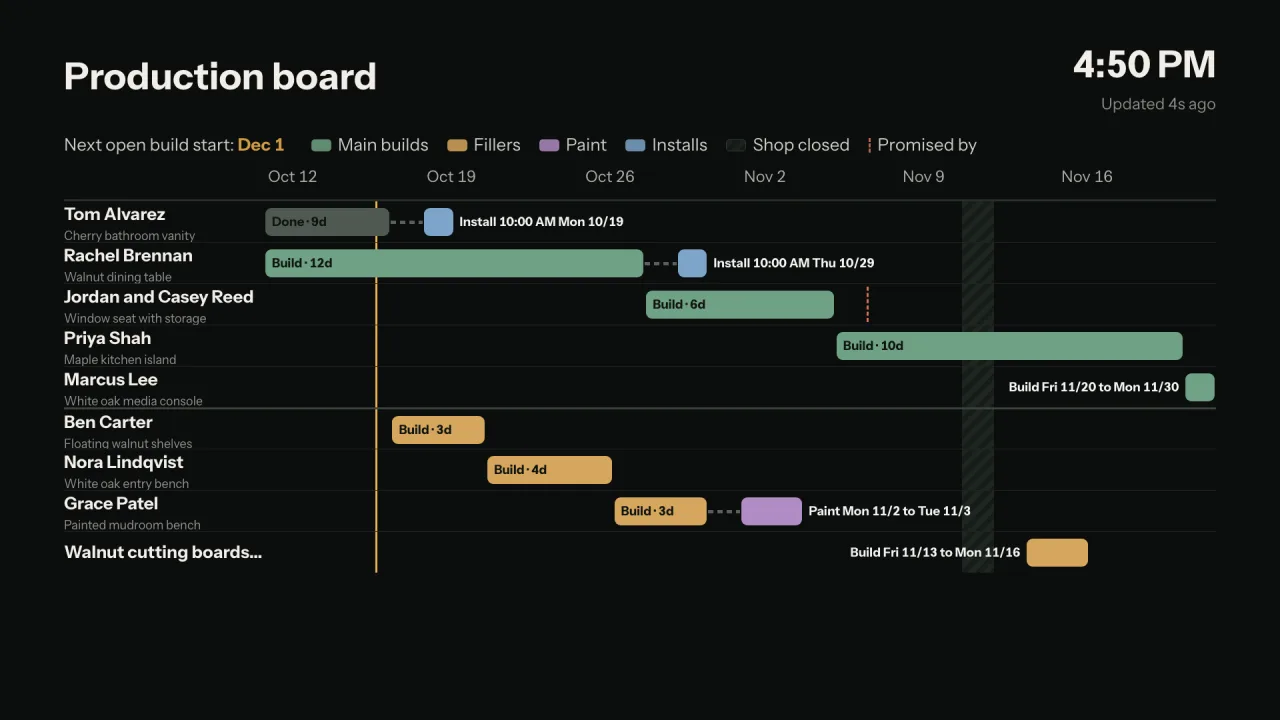
A schedule a small shop can actually keep.
Turn hours into shop days.
Take the labor hours from the estimate and divide by the hours you really build in a day, not the hours you're in the shop. That's the job's shop days.
One big build at a time.
In a small shop the big jobs run one after another. That lane decides when the next client can start.
Fill the gaps with small jobs.
Mantels, shelves and small pieces fit around the big build while glue and finish dry. Keep them in their own lane so they never push a big job back.
Mark the dates you promised.
A holiday, a move-in, a party. Write the promise on the job and check the schedule against it every week.
Pad the start you quote.
Quote a start week with about a week of padding. Finishing early is a nice surprise; starting late is a phone call you don't want.
Block the days you aren't building.
Vacations, shows and install days. A schedule that ignores them is wrong before it starts.
Put it where the crew can see it.
A whiteboard or a TV on the wall, so nobody has to ask what's next.
Tell clients when it moves.
If a start date moves more than a few days, let the client know before they ask.
The Production board.
Click Production for a timeline of your shop's builds. Build days start from the estimate's labor hours divided by your shop hours in a day, and you can change them any time.
- Main lane and Filler lane. Big builds run one at a time. Fillers never push the main jobs.
- Promised by. Give a job a promised-by date and the board shows Past a promise when the schedule runs past it.
- Next open build start at the top, and Next available start on a job that isn't scheduled yet, so you can answer a lead.
- Blocked days and Lock. Block the days the shop isn't building, and Lock keeps a bar where it is.
A start week, not a promise to the day.
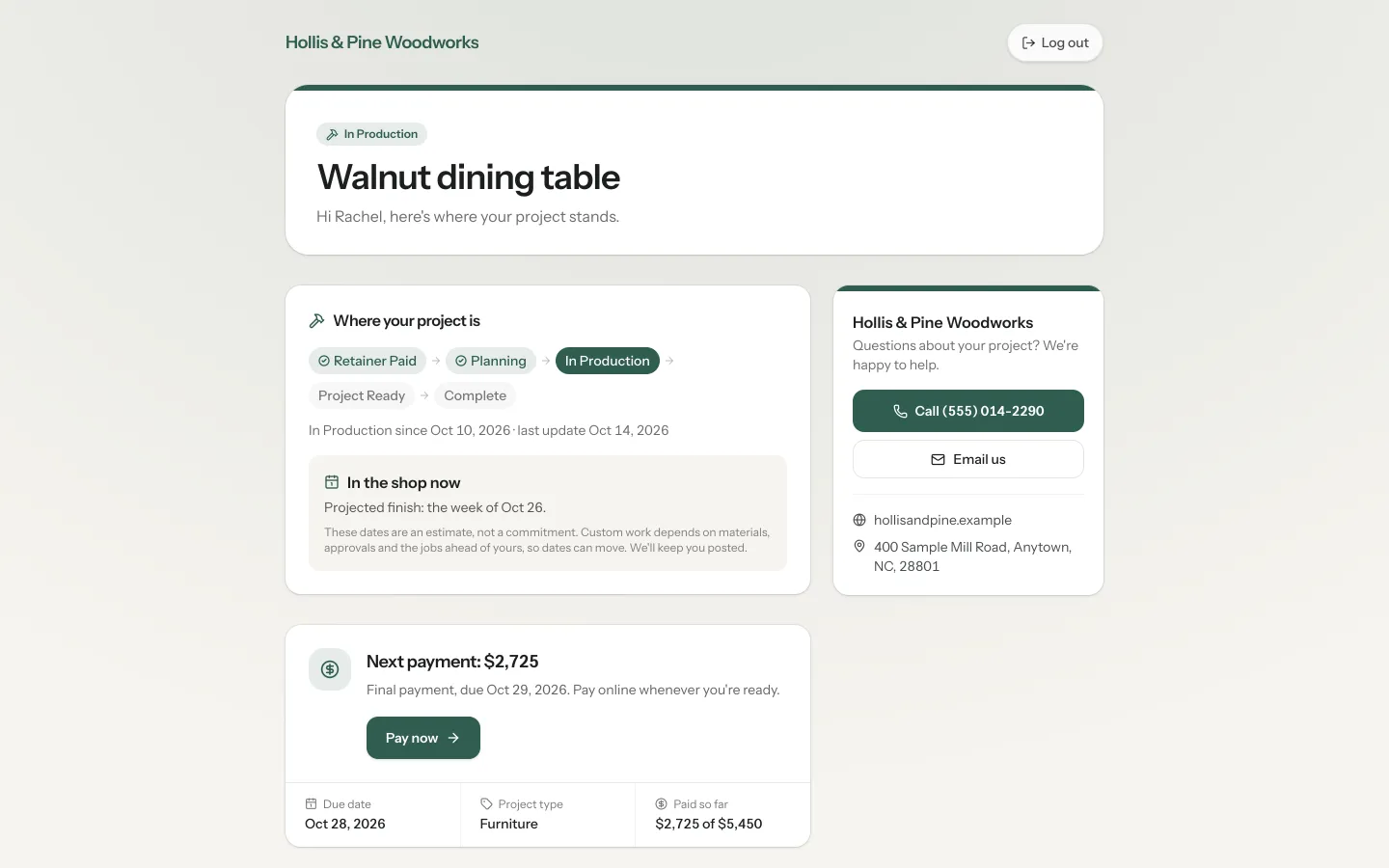
The proposal shows a Projected start week and a Projected build time, with the note "These dates are an estimate, not a commitment." The start includes your padding, about a week to start. Their portal shows the same projected weeks once the job is on the board.
When a job's start moves more than your set number of days, Square Away writes a schedule update email and holds it at the top of the Production page. Nothing goes out until you click Send it.
The schedule on the wall.
Shop TV puts the production board, job tickets, cut lists, today and this week, and what's late on a TV in the shop. It never shows prices or money. You need a TV with a small computer plugged into it, like a mini PC. The Production board and Shop TV are on every plan.
What it does, and what it leaves to you.
It starts from the estimate's hours. You know the job, so change them when they're wrong.
Clients see a week with your padding, never an exact day, unless you lock a date you agreed on.
On a phone the Production page shows a list of the dates.
Schedule update emails wait for you. Only the shop owner can send them.
More on scheduling.
How far out should a small woodworking shop book?
As far as your sold jobs reach, and no further. Quote a start week from your real schedule with some padding, and don't promise a date the board can't back up.
What is a filler job?
A small piece, like a mantel or a set of shelves, worked in the gaps of a big build while glue and finish dry. Filler jobs keep the shop busy without moving the big jobs back.
How do I give a client a start date I can keep?
Count the shop days of every job ahead of theirs, add their own, and quote the week with about a week of padding. If it moves, tell them before they ask.
Put your jobs on the board on the call.
Bring the jobs you've sold. We'll put them on your Production board and you'll see your next open start before we hang up.