How do I track part payments, checks in the mail and add-on work?
Record exactly what the client paid and leave the rest due as its own payment, with a date. When a client says the check is in the mail, pause the reminders without forgiving the balance, and follow up if it hasn't shown up in about ten days. When they add work after signing, give it its own estimate and invoice instead of rewriting the job they already agreed to.
Custom work rarely gets paid in neat round numbers. Your records should match what landed in the bank, not what the proposal hoped for.
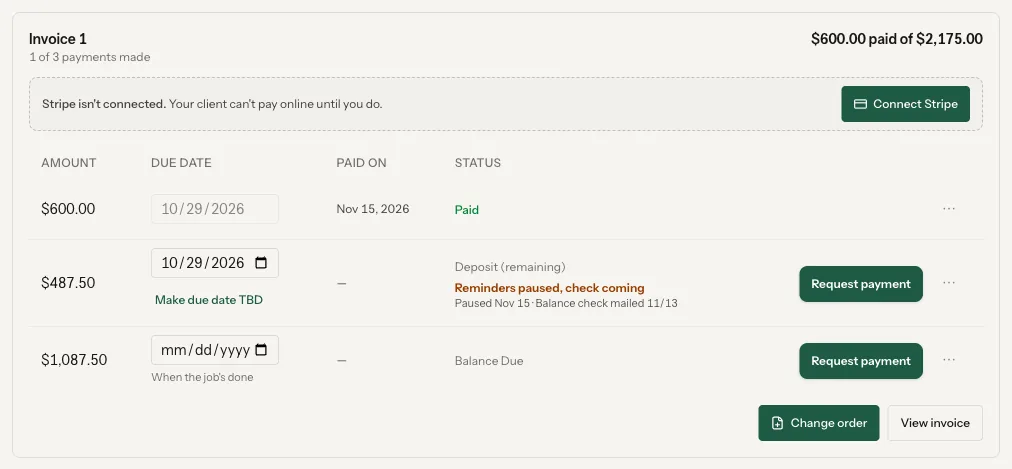
Money that matches the bank.
Record what actually came in.
If they paid $1,500 of $2,000, mark $1,500. The other $500 is still owed.
Give the rest its own due date.
A balance with no date never gets collected.
Pause reminders, don't erase the balance.
A check in the mail is a reason to stop nagging, not a reason to mark it paid.
Follow up after about ten days.
If the check hasn't landed, call.
Add-ons get their own paper.
A mantel added to a built-in job gets its own estimate, proposal, signature and invoice.
Copy the right people.
A spouse, a designer or a builder can get the payment emails too.
The Payments card on every job.
Every payment on a job's schedule has a menu on the Payments card. Nothing here is sent to the client unless you send it.
- Part payments. In Mark as paid, type the Amount received. If it's less than the payment, the rest stays due as its own payment with the same due date, and you can change the date after. This is for checks, cash and other payments you mark yourself; card and bank payments record themselves.
- Check is in the mail: pause reminders. Add a note like "check mailed 11/4" and tap Pause reminders. It still counts as owed, the row reads Reminders paused, check coming, and after 10 days it shows up in Act now. Resume reminders undoes it.
- Make due date TBD for a payment you can't date yet. When it's time, Request payment makes it due today and sends the client a link to pay.
- Card and bank payments go through your own Stripe account. On a free trial without a card, add your card first under Bank and payouts; you aren't charged until your trial ends. Until then clients see check, cash, Zelle and Venmo.
More than one invoice on a job.
From the job's Create menu, or New invoice on the Payments tab, say what it's for, like Beam mantel, and tap Start its estimate. It opens a brand new estimate, then the usual proposal, signature, deposit and invoice, and the first estimate is left alone. Invoices show in order on the job: Invoice 1, Invoice 2: Beam mantel. Add-ons don't restart your proposal follow-ups; payment reminders still run on each invoice.
Need the spouse or the designer on the emails? On the job's people row, + Add, Add a client contact. Each client email gets To, CC or Off per person, and the job remembers it for payment requests and reminders.
What it does, and what it leaves to you.
Card and bank payments through Stripe record the real amount on their own.
The payment still counts as owed, and it comes back to you in Act now after 10 days.
Pausing, splitting and TBD dates send nothing to the client.
Only the owner and people who can see money work the Payments card.
More on getting paid.
How do I record a partial payment on a custom job?
Mark the payment as paid and type the amount you received. Square Away keeps the rest due as its own payment with the same due date.
Can I stop payment reminders when a client mails a check?
Yes. Check is in the mail: pause reminders stops them on that one payment without marking it paid, and it shows up in Act now if 10 days go by.
How do I bill a client for extra work after they signed?
Start a new invoice on the same job. It gets its own estimate, proposal, signature and invoice, and the original job is untouched.
Can more than one person get the invoice emails?
Yes. Add a client contact to the job and set them to To or CC on each email. The job remembers it for payment emails.
Set up your payment schedule on the call.
Bring a job you're collecting on. We'll set up the payment schedule and connect your bank so clients can pay online.