How should a small shop handle time off and timecards?
Keep one list of the days the whole shop is off, so bookings and the build schedule both skip them. Let the crew ask for time off by the hour, not just whole days, and approve it against the schedule for that day. Have everyone send their hours at the end of each pay period, before their next shift, so payday never waits on a chase.
In a three-person shop, one surprise day off moves the whole week. A clear way to ask, and one place to see it, fixes most of that.
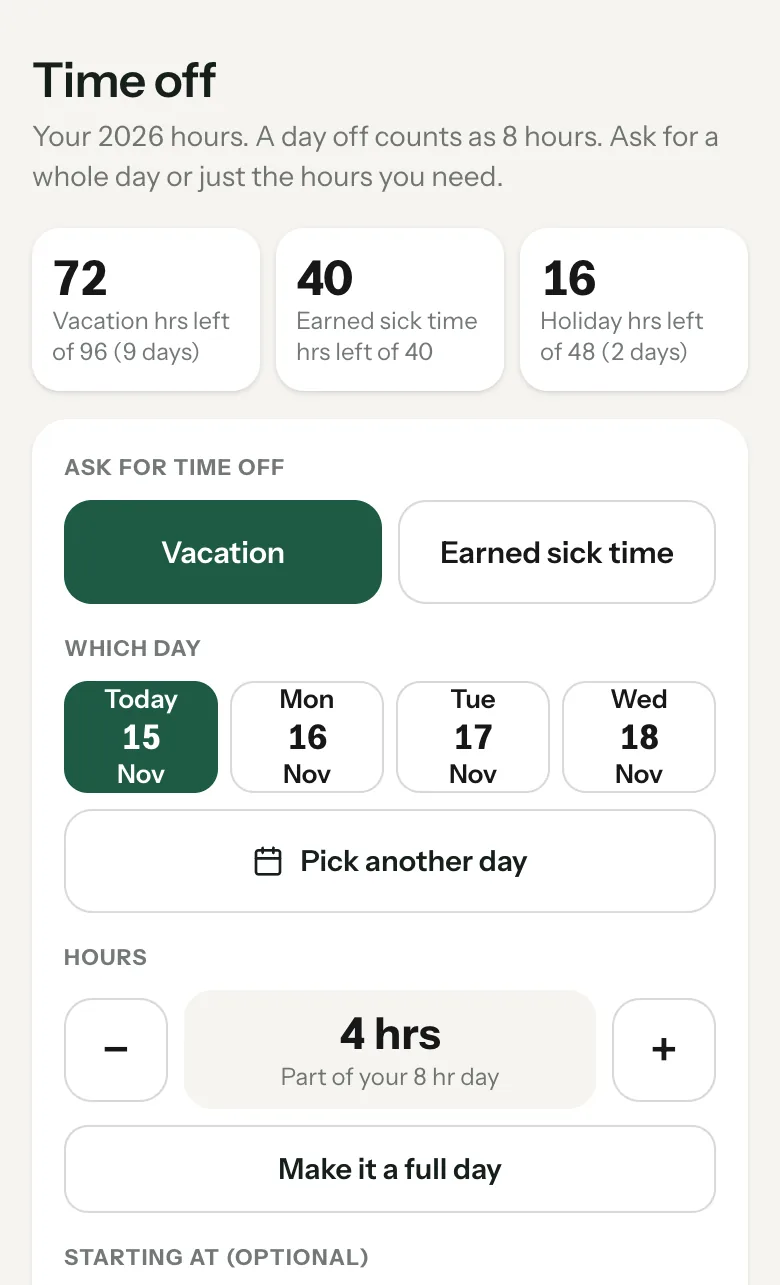
Time off without the guesswork.
Keep one list of shop days off.
Holidays, shows, vacation weeks. Bookings and the build schedule should both read from it.
Let people ask by the hour.
A dentist appointment is two hours, not a day. Half-hour steps cover it.
Whole vacation days, ahead of time.
Sick time and missed hours can come in the same day. A full vacation day gets asked for ahead.
Approve it against the board.
Look at what that person has on the production board that day before you say yes.
Show time off next to hours worked.
So payday adds it up right, and it never counts toward overtime.
Hours sent before the next shift.
When a pay period ends, hours go in before the next clock-in.
Time off and the Timecard.
On the Shop plan and up, a crew member opens Work, Timecard, Time off. Pick Vacation or Earned sick time, the day, and the hours in half-hour steps, then send it to the owner, who gets a buzz.
- The owner approves on the Timecard under Your team, Requests. Each ask shows the hours, what they worked that day and what's on the Production board that day. Approve or Say no.
- Only the hours asked for come off the balance. They show next to the day's worked hours on the timecard and the payday sheet, and never count toward overtime.
- Hours must be sent before clocking in. An owner switch, off by default. Once a pay period ends, the crew sends their hours before their next clock-in, in one tap that does both. The owner can still approve without someone, and it records who did.
- The payroll card names who it's waiting on, so you know who to nudge.
- The job picker puts today's production board first, then the jobs that person clocked most lately, with a search box.
Days the shop is off.
On the Production page, Days the shop is off: tap every day you're not working and save once. Nobody can book an appointment those days and the production schedule builds around them. The same list is under Tools, Scheduler, Out of office, where you can also block a few hours or a long stretch, with a reason only your team sees.
Booking in-person visits? Each in-person session type has a Drive buffer, an hour by default, so nobody books a site visit right on top of another one. Phone and video calls can still sit right next to it.
What it does, and what it leaves to you.
Days off and the drive buffer are on every plan.
If no time-off hours are set up, the ask tells them to ask the owner.
It's a per-shop switch in Hours, pay and holidays, and it never blocks the owner.
On an off day clients just see no open times.
More on time off.
Can employees ask for part of a day off?
Yes. In Square Away they pick the hours in half-hour steps, from half an hour up to a full day.
Does time off count toward overtime?
No. Approved time off shows next to hours worked and comes off the balance, but never counts toward overtime or the weekly hours cap.
How do I block days off for the whole shop?
On the Production page, tap the days in Days the shop is off and save once. Bookings and the production schedule both skip them.
Can I make my crew send hours before payday?
Yes. Turn on Hours must be sent before clocking in, and after a pay period ends they send their hours before their next clock-in.
Set up your timecard on the call.
Bring your pay period and your crew. We'll set up the Timecard and mark the days you're already off.